
 What are AIM Expressions?
First released with AOL Instant Messenger 5.0, AIM Expressions are a way to personalize AIM. Expressions add custom graphics to your buddy list and instant message windows. They aren't a true application skin because they don't change the interface, but they can be fun just the same.
Do my friends see my Expression?
Unless your friend has specifically loaded it, no. Expressions, unlike Yahoo IMvironments, are not automatically shared with the people you IM. Only you see it. They will, however, see the buddy icon used by your Expression.
Can I create my own Expression?
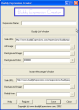
The short answer is yes. You can download an older, desktop program: AIM Buddy Expression Creator. They have a free trial version that they claim lets you create up to five Expressions, but when I tried it, it expired after creating only one! Otherwise, it looked pretty good and it did work.
But I would recommend the official (and free) web-based Expression Creator at http://expressions.aim.com.

What you need to create the various images
- Buddy List Background: 130×160 BMP
- Buddy List Top: 120×60 GIF (you have to include an image, although it won't actually be used by the Expression; AIM will automatically display an ad there)
- Buddy List Side: 60xAny GIF (the height is up to you)
- IM Background: Any sized GIF (experiment with different sizes to get the result you want)IM Side: 125xAny GIF (pick your own height)
- Buddy Icon: 48×48 GIF (if non-animated) or 50×50 GIF (if transparent or animated) must be smaller than 7 KB!
The tricky part for most is that the Buddy List Side and IM Window Side actually must be web pages hosted somewhere on the Internet (if you want to share the Expression). Set up the web pages with the images and use <BODY scroll=”no”> to turn off the scroll bars. Then enter the location for all the images and files into Expression Creator and save the Expression. That's basically all there is to it!
If you want to share your Expression, all you need to share is the ARF file. Again, if you host this on a web server, you can create a hyperlink in this format:
<a href="aim:GetExpression?URL=https://bigblueball.com/wp-content/uploads/2009/03/civilwar.arf">Civil War Expression</a>
Replacing the URL with the proper address to your ARF file. If you're running AIM 5.0 or newer, you can test the link and see my first attempt at creating an Expression.
Useful Links
- What is AIM?
- Brady Vercher's AIM Expression Tutorial provides another tutorial that gives advanced users greater flexibility.
- AIM Support forum on BigBlueBall.com

Very insightful. Will definitely share this article on my Twitter account. Looking forward to your future posts.